
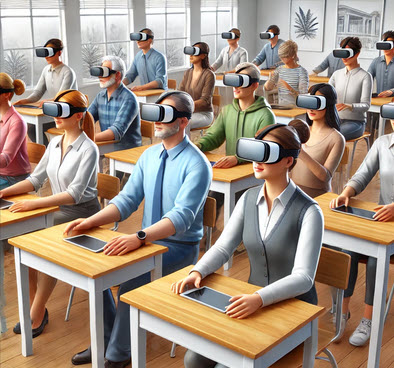
Created with ChatGPT.
In the interest of planning a class field trip, I was reading the blog post, 25+ Field Trips for English Language Learners. She provides a variety of opportunities for live field trips. I am considering a few of these ideas. However, I teach in a situation that has several obstacles to taking students on field trips. Climate, cultural norms, transportation, scheduling, catering and budget can be issues in the Middle East. I am sure that if you are reading this in Canada, you can identify with a few of these issues. Even if you do resolve the budget, scheduling, transportation, permissions and climate issues, then you are normally limited to locations 100km from your centre.
Virtual field trips offer possible alternatives to live field trips as they are not constrained by these factors. Virtual field trips can be taken during your class time, without catering, transportation, permission slips, and weather appropriate clothing. It is true that the students do not gain the benefit of authentic communication with the community, but virtual experiences potentially allow a class to experience a limitless number of interesting destinations.
There are so many ways to experience virtual field trips. I have provided notable virtual field trip destinations (links) at the end of this post. Each of these has its own strengths and characteristics that suit different students and goals. I have chosen to focus on Google Expeditions in this short blog post as I have tried it with teachers and students. It seems to offer the most potential of expanding its resources using student mobile devices and relatively inexpensive cardboard viewers. The online Google Expeditions buzz has affected millions of students globally.
Google Expeditions or virtual field trips can also be used in conjunction with virtual reality viewers. I have used the less expensive, cardboard options which are less than 10 USD. These work with a mobile phone mounted inside the viewer. The field trips are just as informative without the 3Dimensional experience. However, the wow factor experienced when using these is worth the effort and expense of acquiring this equipment.
Google Expedition trips are collections of virtual reality 3D images and 360° panoramas annotated with details, points of interest, and teacher provided prompts. Teachers lead students through a field trip using the questions provided as a guide. It is recommended that the teacher uses a tablet device rather than a mobile phone as more details are available to an instructor. Google works with a number of partners to create a wealth of diverse educational content. Currently there are more than six hundred destinations that you can travel to with your students with Google Expeditions.
Steps towards using Google Expeditions with your students
- Acquire VR (virtual reality) viewers (Optional)
- Download a Google Expeditions quick start guide for teachers http://bit.ly/2qc6C3d
- Get the app (students and teacher)
- Ensure that the classroom Wi-Fi is working properly
- The teacher logs on and starts a tour as a guide
- The students join the tour
- The teacher selects vistas and follows the tour provided by the expedition
- The students listen to the instructor and follow the tour
- Students and teachers exchange information through questions and discussion
- The instructor closes the tour
- The students close the Expeditions app
- A post activity of some kinds should follow this learning event
If you as a teacher do not feel comfortable using new technology with students, possibly partner up with one of your peers and run an expedition with a pilot class to test the technology. There are several issues that could arise and this is normal when testing out new technology. Some of the issues that we have faced are:
- the Wi-Fi is slow or does not have enough connection points
- student devices run out of battery charge during the expedition
- students lose focus and are attracted to other aspects of the vista
- students drop the viewer/ mobile device
- electronic notifications interrupt the tour on individual phones
After a few tours the students and instructors become comfortable with the activity or they avoid it based on how much disruption is caused by the technology failing. I hope that you have a positive experience with Google Expeditions. Usually, when students or teachers first take a tour, their smiles and body movements make the exercise worthwhile. If you have any additional resources or experiences with virtual tours please comment below.
References
Allan, John. (2017). Google Expeditions Teachers’ Quick Start Guide. http://bit.ly/2qc6C3d
Benwell, Tara. (2015). ESL library blog: http://blog.esllibrary.com/2015/05/27/ell-field-trips.
Discovery Education’s Virtual Field Trips http://bit.ly/2cXuEqd
Google Expeditions https://www.google.com/edu/expeditions
Google Expeditions Partners https://www.google.com/edu/expeditions/partners
Google VR Viewers https://vr.google.com/cardboard/get-cardboard
Google Expeditions Database of Tours http://bit.ly/1GxJ9xf
Google Expeditions Community http://bit.ly/2s0Hevy
Microsoft Education’s Virtual Field Trips http://bit.ly/2dimAnP
Murray, Jacqui. Classroom Management: 9 Free Virtual Field Trips. http://bit.ly/1B0Mv5D

7 Comments
Great Idea! I’ve done this with Google Earth (“It’s snowing – who wants to go to Tahiti today?”) It was great for casual Stage 1 preposition practice and /wh/ questions, but it I never went back to streamline it for more structured in-depth applications. This looks like just the ticket!
Thanks!
Beth, awesome! I had a much longer piece but cut out details of other resources to keep this post under the recommended word count. 🙂 I agree that Google Earth is a great way to have a similar experience. Thanks for sharing.
That is a great idea! We as teacher have to surprise students with the latest techniques, interesting activities and bright ideas to attract them to learning and achieving their goals. Thank you John
Abdulsalam, I agree when technology adds value or offers learning that may not be possible without it we should use tech. Taking virtual field trips is a good example of that.
Thank you SO much for telling us about this. Within five minutes of reading your post I was on Amazon looking for the cheapest Cardboards I could find. I’ll be trying them out with my learners as soon as they arrive in the mail. Unfortunately, they probably won’t arrive before the last day of this term. I’ll keep you posted, even if that’s not till September.
Kelly, you are most welcome. Looking forward to learning about your experience!
I have just located another useful archive of virtual field trips for a variety of disciplines. It looks promising and may offer alternatives that are not available elsewhere.
http://bit.ly/2trLaJq